- Blogs
- WPS Payroll and HR
- SIF File Format UAE: Every WPS Field Explained (2026)
Oct 29, 2026
SIF File Format UAE: Every WPS Field Explained (2026)
Share this article
- UAE SIF File Format: EDR, EVP and SCR Fields Explained
- What Is a SIF File?
- How a SIF File Is Structured: EDR, EVP and SCR
- SIF File Naming Convention
- The MOL Establishment ID (Employer ID) for WPS
- Where the SIF Specifications Disagree
- How to Create a SIF File for WPS
- Why SIF Files Get Rejected
- Why SIF Accuracy Matters More Under Resolution 340 of 2026
- Which Businesses This Applies To
- FAQ About SIF file Format in UAE
- Final Thoughts
UAE SIF File Format: EDR, EVP and SCR Fields Explained
TL;DR:
- A SIF file (Salary Information File) is the comma-separated text file a UAE employer sends to its WPS agent so salaries can be paid and reported through the Wages Protection System.
- Every SIF file has one EDR line per employee, an optional EVP line for allowances, and exactly one SCR control line at the end. Each line carries 10 comma-separated values.
- The employer ID in the SCR line is your MoHRE (formerly MOL) establishment ID, padded with leading zeros to 13 digits. The same 13 digits start the file name.
- Bank guides disagree on a few field lengths. When they do, your own WPS agent's specification wins, so check it before you build a template.
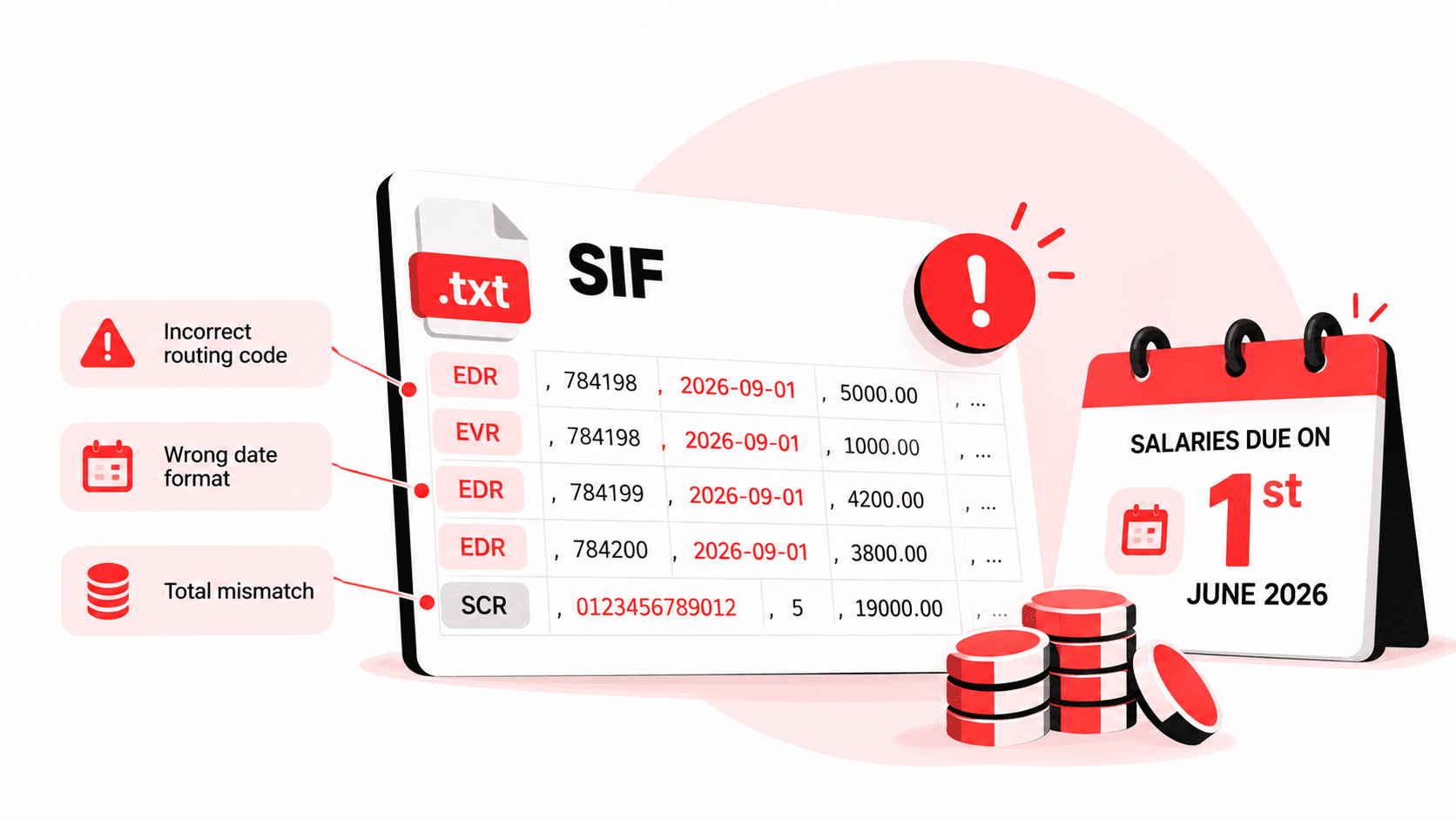
A SIF file looks like a spreadsheet saved as plain text, and that is roughly what it is. The catch is that the Wages Protection System reads it like a machine reads a form: one wrong digit in a routing code, a date typed as 01/09/2026 instead of 2026-09-01, or a total that is off by one dirham, and the whole file can bounce. Since 1 June 2026 that matters more than it used to, because salaries are now due on the 1st of the month with no grace window.
This guide walks through the SIF file format field by field, using the bank specifications that are actually published, and flags the places where those specifications contradict each other.
What Is a SIF File?
A SIF file is the Salary Information File an employer submits to its WPS agent (a bank, exchange house or approved payment provider) to pay employees through the UAE Wages Protection System. The original Ministry of Labour and Central Bank guide defines it in one line: the SIF "provides the salary information for one or more employees of the employer."
The flow is simple once you see it laid out:
- The employer builds the SIF file and sends it, with funds, to its agent.
- The agent passes the salary data into the UAE WPS run by the Central Bank of the UAE (CBUAE).
- According to the CBUAE's UAEWPS page, the bank "secures the employer's funds before dispatching the wage information to the agents" that credit employees.
- The same system "empowers the CBUAE, and thereby the Labor Regulatory Authority (LRA)" to monitor whether wages were paid.
The CBUAE implemented the UAEWPS in 2009. The Ministry of Labour started it, which is why so many field names still say "MOL". Federal Decree No. 14 of 2016 renamed it the Ministry of Human Resources and Emiratisation (MoHRE).
How a SIF File Is Structured: EDR, EVP and SCR
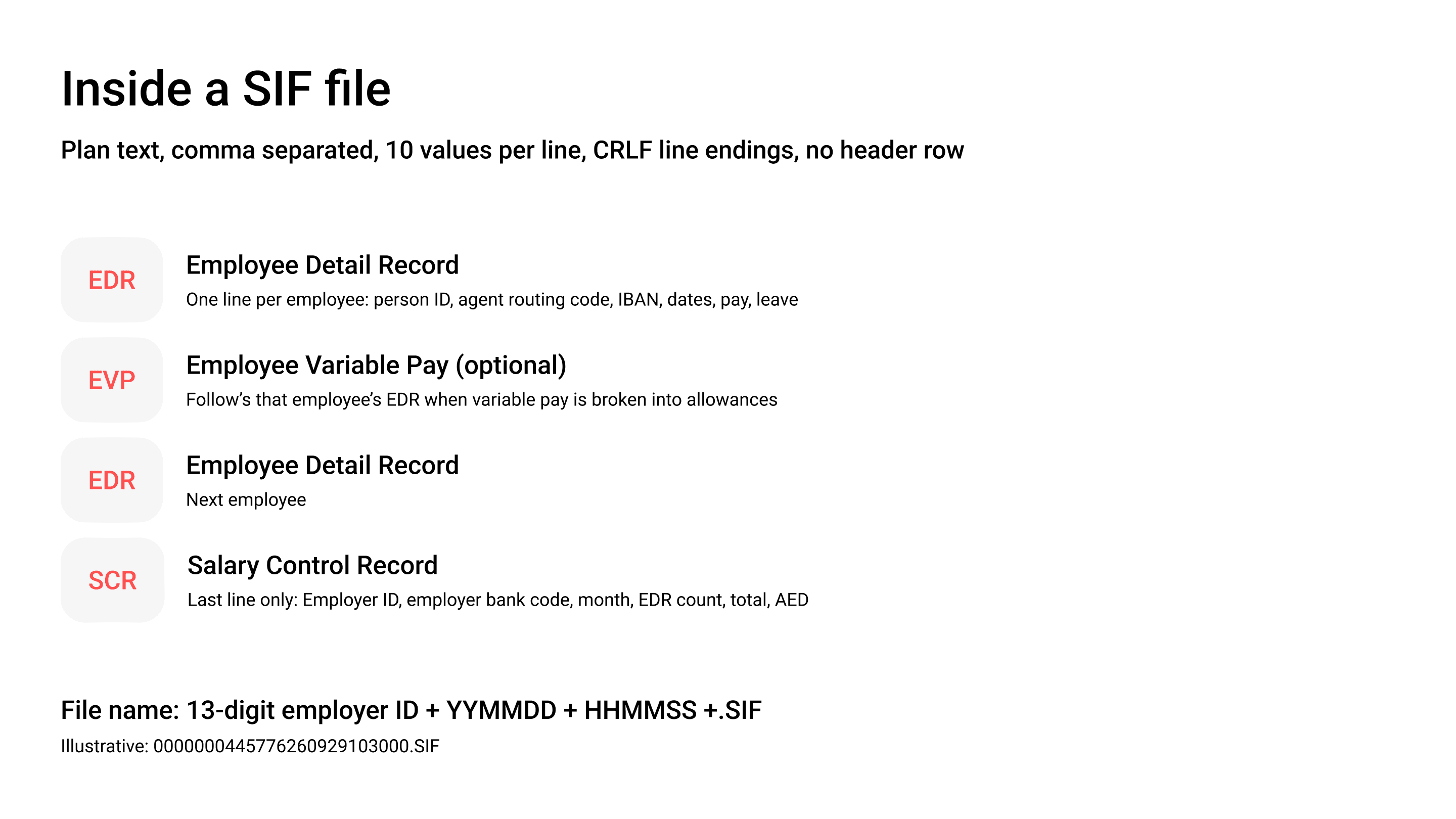
A SIF file contains three record types, always in the same order: one or more EDR lines, an EVP line after any employee who receives a variable pay breakdown, and a single SCR line as the last record. The 2010 Companies Responsibility Guide (document WPS-CRG01, published by the Ministry of Labour and the CBUAE) sets the core rules:
- "One or more EDR records are required followed by a SCR record in the SIF file."
- Records are comma-separated values, and "each record must be terminated by a CRLF" (carriage return and line feed).
- Every line must hold exactly 10 values. Error code 00826 reads: "Invalid File format. Each line should have 10 comma separated values."
- There is no header row. None of the published specifications describe one, and a header line would break the 10-value rule.
EDR fields: the Employee Detail Record
The EDR is one line per employee, carrying who is paid, where, for which dates and how much. The table below combines the Ministry of Labour/CBUAE guide (2010) with the current bank guides from Mashreq, Dubai Islamic Bank (DIB) and Emirates Islamic.
Two details catch people out. The days-in-period count includes both ends, so 1 to 30 September is 30 days, not 29. And Mashreq's published WPS file format wants amounts with two decimals ("2345.67, 23.00"), while the 2010 guide also accepted whole numbers like "22". Two decimals is the safer habit because every specification accepts it.
SCR fields: the Salary Control Record
The SCR is the single last line of the file, and it works as a checksum: it tells the system who the employer is, which month is being paid, how many EDR lines to expect and what they should add up to.
Mashreq's specification spells out that the total is "the sum of all fixed and variable salary components of all employees mentioned in the EDR records". If your EDR count or total does not match the lines above it, expect a rejection.
The EVP record: when allowances need a breakdown
The EVP (Employee Variable Pay) record splits an employee's variable income into named allowances. Emirates Islamic's guide states the EVP record "is mandatory only if variable amount is provided" in the EDR, and it sits directly after that employee's EDR line.
DIB's file format guide lists the EVP fields: record type EVP, employee unique ID, routing code of the agent, then housing, conveyance, medical, annual passage, overtime, all other allowances and leave encashment. That is 10 values again. The 2010 Ministry guide predates the EVP record, and not every agent publishes it, so ask your agent whether it expects EVP lines before you add them.
SIF File Naming Convention
A SIF file name is the 13-digit employer ID, then the creation date as YYMMDD, then the creation time as HHMMSS, followed by the .SIF extension. That is a 25-character name, written as EEEEEEEEEEEEEYYMMDDHHMMSS.SIF in both the 2010 guide and Mashreq's format page.
Here is how the pieces fit, using illustrative values only:
- Employer ID 445776 becomes 0000000445776
- Created on 29 September 2026 becomes 260929
- Created at 10:30:00 becomes 103000
- File name: 0000000445776260929103000.SIF
Duplicate file names are not allowed, and error 00805 rejects a "Duplicate SIF file" that "has either already been processed or rejected". If you fix and resubmit, the new file needs a new creation time in its name. Mashreq also rejects a file when the dates or times in the name, EDR lines and SCR line do not agree.
The MOL Establishment ID (Employer ID) for WPS
The MOL establishment ID is the number MoHRE assigns to your company as an employer, and in WPS it becomes the 13-digit employer unique ID in both the SCR line and the file name. The 2010 guide puts it plainly: "The ESTABLISHMENT ID is number and in the WPS this is always referenced as a 13 digit number." Its own example: "If your establishment id is 445776 then in the WPS this is always referenced as 0000000445776."
Emirates Islamic's current guide says the same thing in different words: "Enter the 13 digit Employer Unique ID (Establishment Number) of the company with Ministry of Labor." So whether your bank calls it the MOL ID, the MoHRE establishment number, the company code or the employer ID, the WPS treatment is identical: take the number and pad it on the left with zeros until it is 13 digits long.
The employee side mirrors this. The 2010 guide defines the person ID as "the 14 digit number that appears in the labor card", and that goes into EDR field 2.
Where to find it. No ministry page we could read on 14 October 2026 names the exact screen where the establishment number appears. In practice, three routes work: your existing WPS agent already holds it from your registration; your PRO or typing centre has it on your establishment records; and MoHRE's own channels can confirm it. Do not guess it from a trade licence number. They are different registers, and CBD's list of common WPS rejection reasons starts with "invalid company MOL ID".
Free zone companies. Rules differ by zone, so check with your licensing authority rather than assuming the mainland process. Two published examples:
- JAFZA states that "all businesses registered with Jafza are required to comply with the WPS system", a rule it introduced in 2012.
- DMCC's guidelines (version 3, updated 17 October 2023) oblige companies to register all employees through the DMCC Member Portal, after which "the Bank/ Exchange House will create the salary file(s)". For shareholder employees, DMCC builds a 14-character ID as "DMCC + 000 + PIC number/ CEC number", for example DMCC0001234567.
For which free zones apply WPS at all, see Peko's guide to WPS vs non-WPS salary in the UAE.
Where the SIF Specifications Disagree
Published SIF specifications do not agree on every field, and these differences cause rejections because a template built from one bank's guide may fail at another. We compared four sources side by side on 14 October 2026.
The IBAN row matters most. Mashreq's IBAN guidance states that the "Employer should provide the IBAN in SIF (salary information file) where EDR routing number is bank", and UAE IBANs are fixed at 23 characters. The 16-character limit is a leftover from before IBANs were mandatory.
How to Create a SIF File for WPS
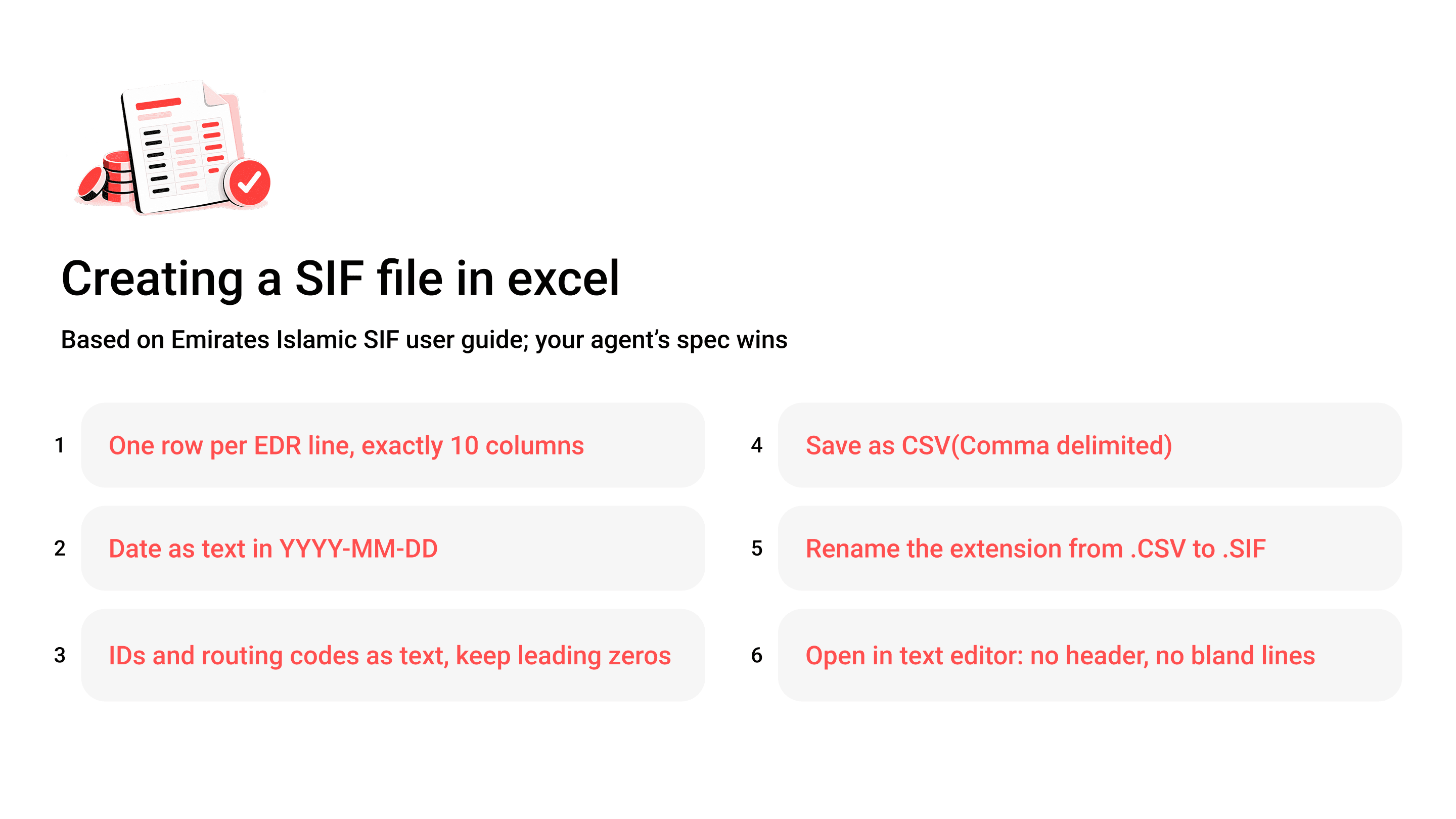
You can create a SIF file in Excel, a bank portal or payroll software, and the result must be the same plain comma-separated text. Here is the Excel route, which Emirates Islamic's guide describes:
- Build one row per EDR line with exactly 10 columns, then one SCR row at the bottom.
- Format every date column as text in YYYY-MM-DD, so Excel does not convert it to its own date format.
- Format ID and routing code columns as text, or Excel strips the leading zeros from the employer ID.
- Save with "Save as Type" set to "CSV (Comma delimited)".
- Rename the extension, as the guide puts it: "Rename the file as SIF instead of CSV".
- Open the file in a plain text editor and check there is no header row, no blank line and no stray quote marks.
One trap: some bank portals take an Excel upload with their own column layout and convert it to SIF for you. CBD's upload template, for example, wants dates as DD/MM/YYYY. That is the bank's template, not the SIF format, so do not copy portal formats into a raw SIF file.
If you run payroll in software, the file is generated for you. Peko's Payroll & HR module generates SIF files "in the format WPS agents accept" and checks totals and employee details before submission, and if you already use a WPS agent you can submit the file through that agent. Acceptance still depends on accurate employee data and on processing by MoHRE-approved banks and agents.
Why SIF Files Get Rejected
Most SIF rejections come from a handful of mismatches: invalid IDs, wrong routing codes, dates that do not line up, and control totals that do not add up. The 2010 guide lists error codes that still explain most rejections, though your agent's current list may differ.
Mashreq adds that "if the routing code is invalid then the entire WPS file will be rejected", and the same applies to a wrong employee ID or account number. One bad line stops everyone's salary, not just that employee's. Our guide to WPS routing codes in the UAE covers how to check field 3 before you submit.
Why SIF Accuracy Matters More Under Resolution 340 of 2026
Ministerial Resolution No. 340 of 2026, in force since 1 June 2026, made salaries due on the 1st of each month, so a rejected SIF file now costs you days you no longer have. According to Morgan Lewis's analysis of the resolution, wages for the preceding month "must be paid on the first day of each Gregorian month", and an employer is compliant when it transfers "at least 85% of the total wages due to workers by the due date", up from 80% previously.
The same analysis describes an escalation ladder: from the second day MoHRE "may issue notifications and warnings", and from the fifth day it "may suspend the issuance of new work permits". A file that bounces on the 30th and is fixed on the 3rd has already crossed the first step. Peko's UAE WPS compliance guide covers the full ladder.
The practical response is to submit early and validate before you submit. Treat the last working days of the month as a buffer, not a deadline.
Which Businesses This Applies To
Every private-sector employer registered with MoHRE that pays staff through WPS deals with SIF files, but some feel the format pain more than others:
- SMEs running payroll in Excel, especially founders and office managers who build the file themselves each month.
- Construction, cleaning, security and transport contractors, where large headcounts mean more EDR lines and, for workers without bank accounts, more payroll card numbers in the account field.
- Companies with variable pay, such as overtime-heavy operations, retail with commissions, and hospitality, which may need EVP lines.
- Free zone companies in WPS zones, like JAFZA and DMCC members, which follow their authority's own registration route.
- Accountants and payroll outsourcers building SIF files for several clients, each with its own establishment ID and bank.
FAQ About SIF file Format in UAE
What is the SIF file format for WPS in the UAE?
The UAE SIF file format is a plain comma-separated text file with a .SIF extension. It holds one EDR line per employee, optional EVP lines for allowance breakdowns, and one SCR control line at the end, with exactly 10 values per line and CRLF line endings.
How do I create a SIF file for WPS from Excel?
Build one row per employee with the 10 EDR fields, add the SCR row last, format dates as YYYY-MM-DD text, keep leading zeros on IDs, save as CSV (comma-delimited) and rename the extension to .SIF. Then check it in a text editor for headers or blank lines.
What is the MOL establishment ID in a SIF file?
The MOL establishment ID is your company's MoHRE employer number. In a SIF file it goes in SCR field 2 and the first 13 characters of the file name, padded with leading zeros to 13 digits, so 445776 becomes 0000000445776.
What is the employee ID in a WPS SIF file?
The employee ID in EDR field 2 is the 14-digit MoHRE person ID shown on the employee's labour card. It must match the ministry's records, and a wrong or duplicated person ID can get the whole file rejected.
Why was my SIF file rejected?
The most common SIF file rejection reasons are an invalid routing code, a wrong IBAN, an incorrect employee or employer ID, dates that do not match the salary month, and an SCR total or EDR count that does not match the lines above it. Your agent's rejection message names the field.
Do free zone companies need to submit a SIF file?
It depends on the free zone. JAFZA requires all its registered businesses to comply with WPS, and DMCC requires employee registration through its Member Portal, with the bank or exchange house creating the salary file. Check your own zone's rules with its authority.
Final Thoughts
The core SIF layout in the 2010 Ministry guide still matches today's bank guides, which is why most rejections are not mysteries. They come from a template that copied one bank's quirks, an Excel column that ate the leading zeros, or a total someone typed by hand. Fix the template once, against your own agent's specification, and most months will go through first time.
What has changed is the margin for error. With salaries due on the 1st, a clean file is part of compliance, not admin. If you would rather not maintain the template yourself, Peko's Payroll & HR generates and checks the SIF file for you, and our WPS salary transfer guide shows where the file fits in the full payment process.
Last verified: 29 October 2026. Written by Adil Rashid Lone, SEO Manager at Peko. This is general information, not legal advice; confirm requirements with MoHRE and your WPS agent.