- Blogs
- Bill Payments
- Etisalat & du Business Quick Pay: 2026 UAE Guide
Sep 11, 2026
Etisalat & du Business Quick Pay: 2026 UAE Guide
Share this article
- Etisalat Business Quick Pay and du Business Payment: The Complete 2026 UAE SME Guide
- What Etisalat Business Quick Pay Actually Covers
- How to Pay an Etisalat Business Bill Online, Step by Step
- du Business Payment: Your Options When e& Isn't Your Provider
- What Happens If a Business Bill Slips Through the Cracks
- Why UAE SMEs Are Rethinking Manual Bill Pay in 2026
- The Real Cost of Juggling Multiple Bill-Pay Portals
- Automating Business Bill Payments with Peko
- Which Industries and Business Types This Applies To
- Frequently Asked Questions About Etisalat Business Quick Pay and du Business Payment
- Final Thoughts
Etisalat Business Quick Pay and du Business Payment: The Complete 2026 UAE SME Guide
TL;DR:
- Etisalat Business Quick Pay lets you settle an e& business account online with just your account number, no portal login needed, through businessonline.etisalat.ae.
- du offers the same no-login convenience through its own Quick Pay page, plus My Account, the du app, banks, and exchange houses.
- Miss either one and you risk a late fee, a service suspension, and a reconnection charge, on top of the time it takes to sort it out.
- If your business juggles Etisalat, du, DEWA, and a handful of other providers, a single bill-pay dashboard like Peko removes the manual chase entirely.
Running a small business in the UAE means paying the same handful of bills every month: mobile lines, internet, a landline maybe, and whatever utility keeps the lights on. Etisalat business quick pay is the fastest legitimate route to clear an e& business bill without logging into anything, and most SME owners find it by accident the first time their card details get lost in a forgotten portal password. This guide walks through exactly how it works, how du's equivalent compares, what happens when a payment slips, and why a growing number of UAE companies are quietly automating the whole process instead of doing it bill by bill.
What Etisalat Business Quick Pay Actually Covers
Etisalat Business Quick Pay is a card-based payment tool that clears an e& business account balance using only the account number, skipping the login step entirely. It sits on e&'s own Business Online Portal infrastructure and works for mobile, internet, landline, and bundled business services.
The feature exists because business owners rarely have time to remember a portal password for a bill they pay once a month. You open the Quick Pay link, type in your account or B2B reference number, choose a card or bank transfer, and the payment posts immediately. e& also runs the same logic through its Business Mobile App, so the same account can be topped up from a phone between meetings.
Three details are worth knowing before the first use. First, Quick Pay only accepts payment against an existing balance; it will not let you view historical invoices, that still requires the full Business Online Portal login. Second, a single Quick Pay session actually covers up to 10 account numbers at once through the “Add Account” option, with a summary-bill account and a bulk file upload available under “More Options” for businesses paying more than 10 accounts in one run, so a company with six branch numbers can usually clear all of them in one session. Third, cheque and cash payments route through a different channel (e& Smart Payment Machines or partner exchange houses), not Quick Pay itself.
How to Pay an Etisalat Business Bill Online, Step by Step
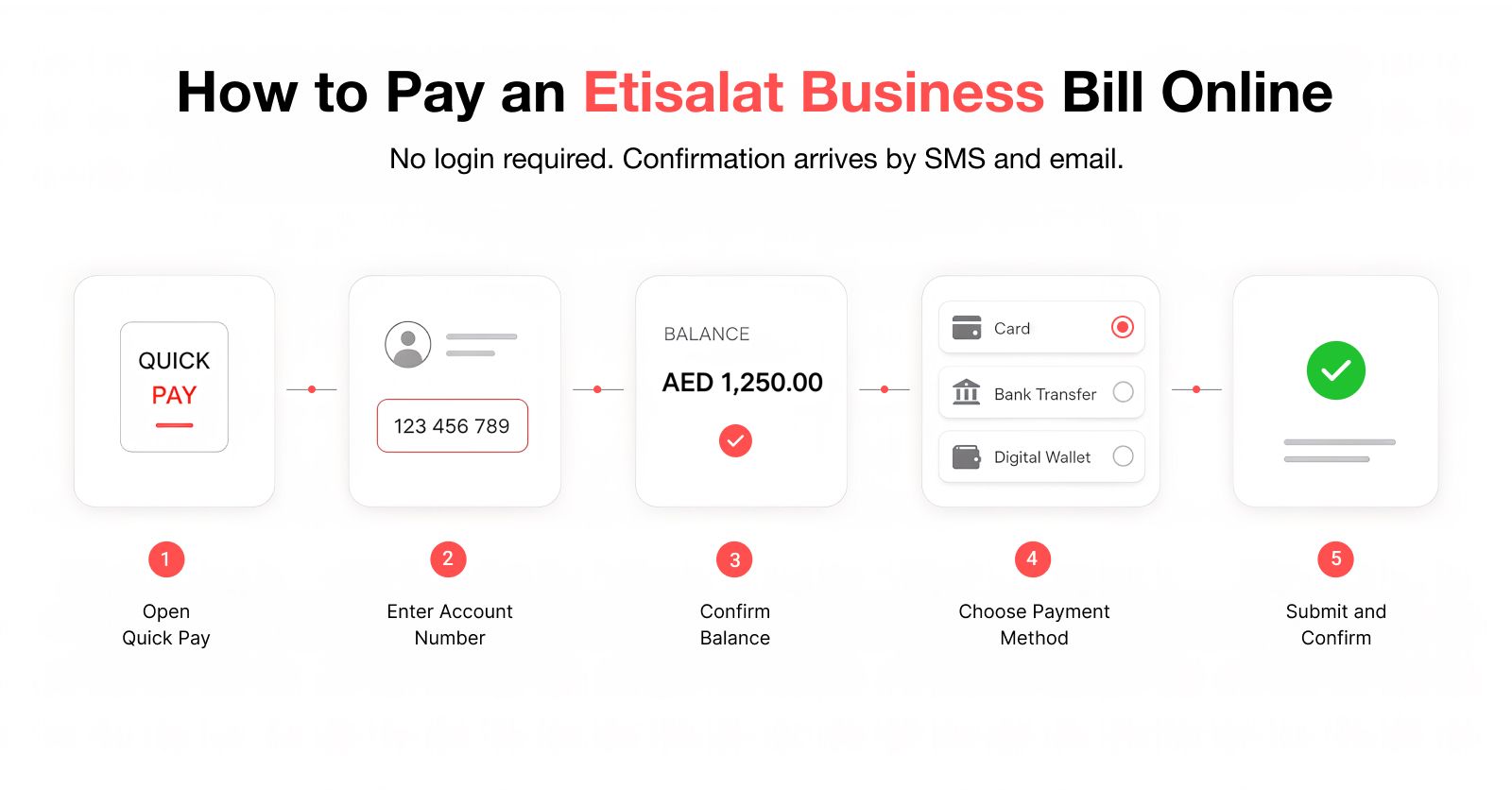
Paying an Etisalat business bill online takes under three minutes if you have the account number and a card ready. The process is identical whether you're clearing one line or a handful.
1. Go to the Quick Pay page on businessonline.etisalat.ae (linked from the “Quick Pay & Recharge” button on eand.ae).
2. Enter your business account number or B2B reference number. No username or password required.
3. Confirm the outstanding balance shown against that account.
4. Choose your payment method: debit/credit card, or, where supported, an online bank transfer.
5. Review the amount and submit. Confirmation arrives by SMS and email within moments.
For businesses that would rather not repeat this every month, the Business Online Portal supports eBill registration. Log in, open the ORDER menu, select “Change Billing Details” under “Manage Subscription,” and choose an e-bill delivery method, billing email, and reference. e& issues the monthly eBill between the 1st and 4th, so it is worth whitelisting eStatement@ebill.etisalat.ae before the first cycle, otherwise it tends to land in spam.
Businesses that prefer not to touch a card at all can still pay in cash or by cheque through e& Smart Payment Machines (using the Party ID or B2B reference number) or through partner exchange houses such as Al Ansari, LULU, and Wall Street Exchange.
du Business Payment: Your Options When e& Isn't Your Provider
du business payment works on the same no-login principle as Etisalat's Quick Pay, just through du's own My Account ecosystem. Enter the du mobile or account number on du's Quick Pay page, pay by card, and the balance clears instantly.
Businesses running du lines have four practical channels. The du Quick Pay page handles one-off payments without a login, useful for a single business number or an internet account, though it sticks to GCC-issued Mastercard and Visa cards only. My Account (myaccount.du.ae) is the fuller option: log in once with a GCC-issued card on file and future payments take a fraction of the time. The du mobile app mirrors My Account for anyone who would rather pay from a phone, and some channels extend further to Apple Pay and American Express for cardholders who have them, worth checking at the point of payment rather than assuming. Finally, a long list of UAE banks (Emirates NBD, Mashreq, ADCB, RAK Bank, and others) let a du bill be paid directly from online or mobile banking, which is often the path finance teams already use for other supplier payments.
Two things are worth flagging for a business account specifically. du's business billing support sits on a separate page from the consumer one, with its own bill-statement and business-billing sections, so bookmark the business URL rather than the general one. And if a company runs both an Etisalat mobile fleet and a du internet line (common for businesses that split providers for redundancy), there is no single du-or-Etisalat portal that shows both, each provider's payment history stays in its own silo.
What Happens If a Business Bill Slips Through the Cracks
Missing a due date on a UAE utility or telecom bill costs more than the payment itself. Utility providers commonly apply late fees in the AED 20 to 50 range once a bill passes its due date, and reconnection charges after a service suspension can run AED 100 to 200, according to consumer bill-payment guides covering DEWA, SEWA, and EtihadWE accounts. Telecom providers have historically applied their own late-payment fees on top, and while regulatory scrutiny has pushed operators to be more transparent about when and how those fees apply, the risk of a paused line or throttled service the week before a client deadline is real for any SME.
For a small business, the bigger cost is rarely the fee itself. It's the account manager who has to stop what they're doing, log into three separate portals, confirm which account is overdue, and process a manual payment, all while a suspended line or a paused internet connection is actively costing the business money in lost calls or downtime. Multiply that across five or six providers and a handful of branches, and bill payment quietly becomes a part-time job nobody budgeted for.
There's a quieter cost too, harder to put a number on but real for any team relying on uptime. A suspended internet line during a client deliverable, or a dropped mobile line during a sales call, doesn't show up on an invoice, but it shows up in a missed deadline or a lost conversation. For a service business, that's often worth more than the late fee itself.
Why UAE SMEs Are Rethinking Manual Bill Pay in 2026
Manual, portal-by-portal bill payment is becoming a genuine competitive disadvantage for growing UAE businesses, not just an annoyance. The clearest signal came in March 2026, when UAE fintech Alaan launched “Alaan Sawa,” a AED 3 million initiative offering up to 1,000 SMEs as much as AED 3,000 each toward their DEWA, SEWA, TAQA Distribution (Abu Dhabi's utility provider, formerly ADDC and AADC), Empower, du, and Etisalat bills over three months. A corporate card company building an entire campaign around covering exactly these bills is a strong indicator of how much pain this specific list of providers causes founders and finance managers day to day.
The underlying pattern is simple. SMEs in the UAE typically deal with a telecom provider (Etisalat or du), a power and water authority (DEWA in Dubai, TAQA Distribution or EtihadWE elsewhere), sometimes a district cooling provider, and often a second telecom line for redundancy. None of these providers share a login, a due-date calendar, or a payment history. Every business either assigns someone to track it manually in a spreadsheet or, more often, discovers a missed bill when the internet stops working mid-workday.
The Real Cost of Juggling Multiple Bill-Pay Portals
Running bill payments across five separate logins costs a business real hours every month, not just the risk of a missed due date. A finance lead handling Etisalat, du, DEWA, a district cooling account, and a landlord invoice is realistically logging into five different systems, checking five different due dates, and reconciling five different payment confirmations against the accounting system by hand.
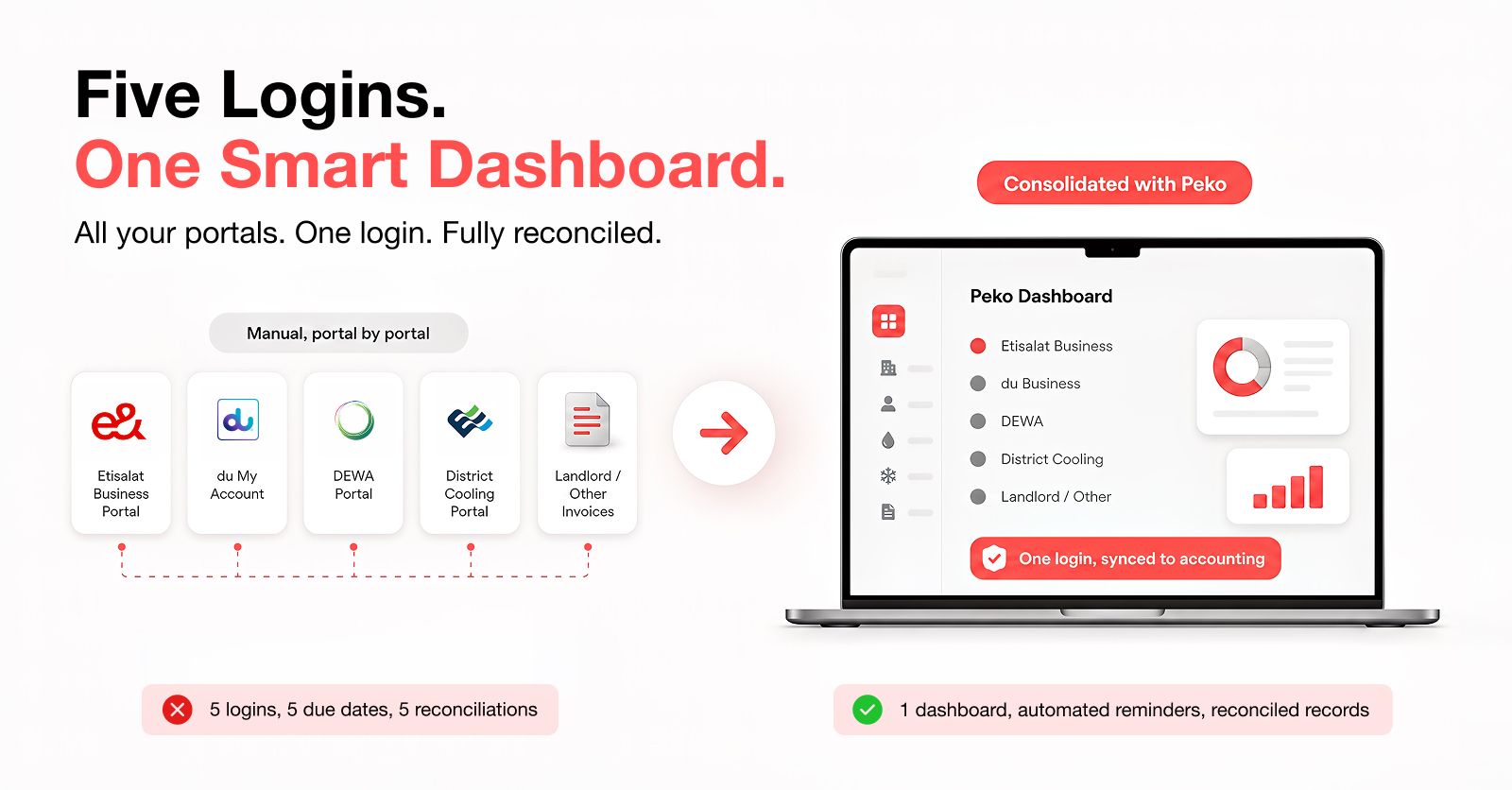
Diagram comparing five separate provider logins versus one consolidated UAE business bill payment dashboard
The gap widens further once a business has more than one trade licence or branch, each with its own set of accounts. What looks like a five-minute Quick Pay transaction on paper becomes a monthly reconciliation exercise that eats into time better spent running the business.
Automating Business Bill Payments with Peko
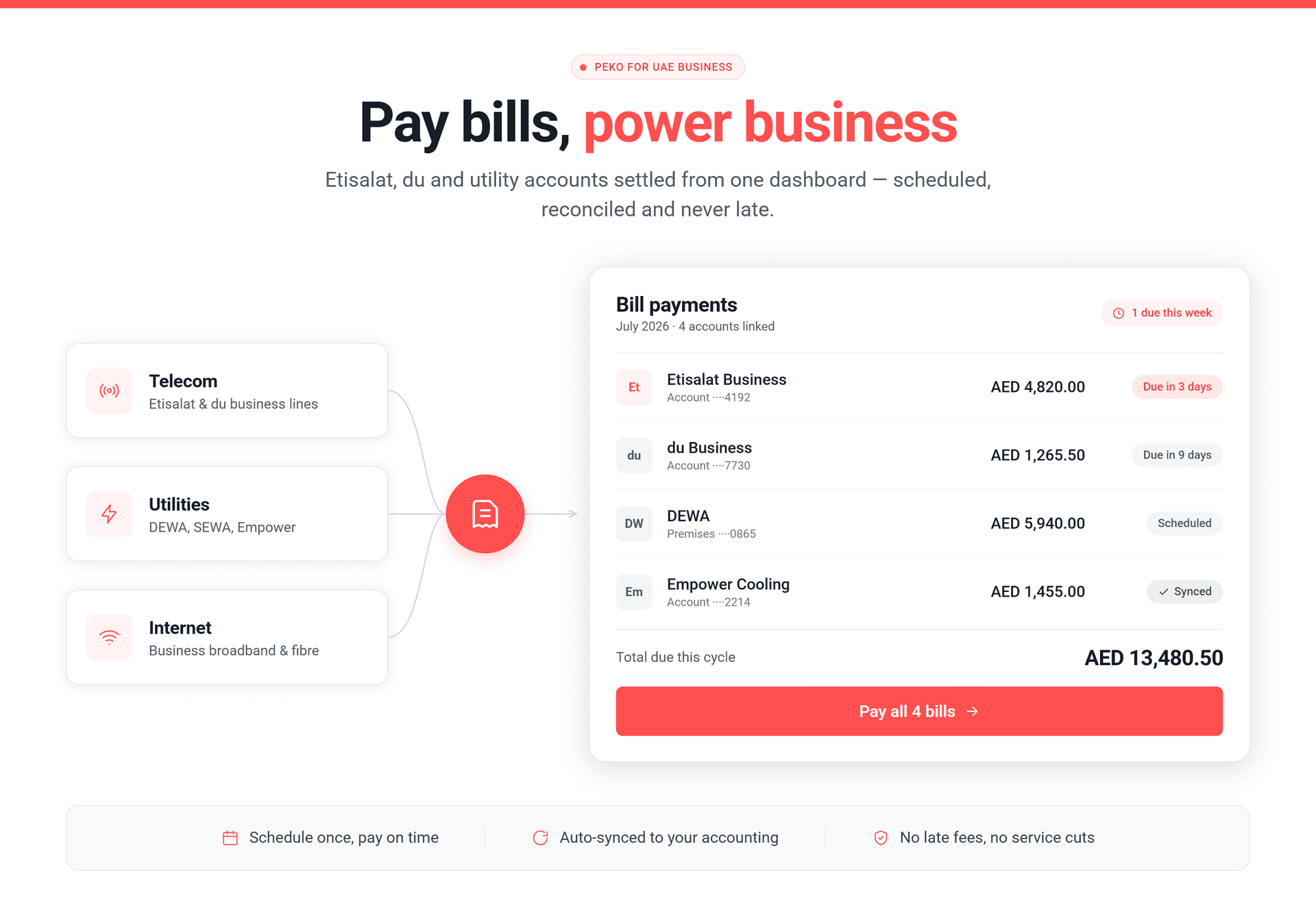
Peko's bill payments feature exists to close exactly this gap: one dashboard for utilities, telecom, and internet bills, instead of a separate login for every provider. You log in once, select the payee, enter the details, and pay, with smart due-date reminders so a business never discovers a lapsed Etisalat or du account by way of a dropped call.
The parts that matter most for a UAE SME are the ones manual bill pay simply doesn't offer. Multiple beneficiaries can be paid in a single workflow rather than one portal visit per provider. Receipts generate automatically and stay attached to each transaction, which saves the scramble at month-end close. And because Peko syncs with accounting and ERP systems, a bill paid through the platform doesn't need to be re-entered anywhere, it reconciles itself. For a founder who still remembers hunting down an Etisalat business quick pay link at 11pm to avoid a late fee, that difference is the whole point.
Peko's mobile app carries the same dashboard, so a payment run doesn't have to wait for a desk, and due-date reminders land wherever the team already checks in. Full details are on Peko's bill payments page, and the Accounting product picks up the reconciliation side once a bill is paid.
Which Industries and Business Types This Applies To
This kind of consolidated bill payment matters most for businesses juggling more than one provider relationship at once, not a single freelancer paying one phone bill. Retail chains and F&B groups with multiple outlets each carry their own DEWA and telecom accounts, multiplied by every branch. Trading and logistics companies running several trade licences across free zones often hold separate Etisalat and du lines for redundancy, plus utility accounts tied to each warehouse or office. Professional services firms (agencies, consultancies, accounting practices) tend to underestimate how many recurring bills sit outside their core software stack until a late fee shows up on the P&L. And any SME actively scaling headcount or opening a second office inherits a new set of provider logins with every move, exactly the point where a manual spreadsheet stops holding up.
Frequently Asked Questions About Etisalat Business Quick Pay and du Business Payment
How do I use Etisalat business quick pay without logging into my account?
Go to the Quick Pay page on businessonline.etisalat.ae, enter your business account number or B2B reference number, choose a card or bank transfer, and confirm. No username or password is required for a standard Quick Pay transaction.
Can I pay multiple Etisalat or du business accounts in one transaction?
Yes, on the Etisalat side. Etisalat's Quick Pay lets you add up to 10 account numbers in a single session through “Add Account,” with a summary-bill account and bulk file upload available for larger batches. du's Quick Pay is built around one account per session, so businesses running several du lines typically pay each one individually through My Account or move the whole batch through a platform like Peko that supports multiple beneficiaries in a single workflow.
What happens if my business misses an Etisalat or du bill payment deadline?
Expect a late fee first, followed by a service suspension if the account stays unpaid, and a reconnection charge once you do pay. Utility late fees typically fall in the AED 20 to 50 range, with reconnection charges around AED 100 to 200, so it is worth setting a reminder well before the due date rather than after.
Is du business payment available through online banking?
Yes. Several UAE banks, including Emirates NBD, Mashreq, ADCB, and RAK Bank, support paying a du bill directly through their own online or mobile banking platforms, in addition to du's own Quick Pay, My Account, and app channels.
How can a UAE SME manage Etisalat, du, and utility bills in one place?
A centralised bill payment platform is the practical answer. Peko's bill payments feature lets a business pay utility, telecom, and internet bills from a single dashboard, with due-date reminders and accounting sync, rather than tracking each provider's portal separately.
Does Peko charge extra fees to pay Etisalat or du business bills through its platform?
Bill payment through Peko doesn't carry plan-based pricing tiers; any card-network or processing fees are shown at the time of payment. Check Peko's current pricing page or contact help@peko.one if you want the specifics confirmed for your account.
Final Thoughts
Etisalat business quick pay and du's equivalent are both genuinely fast once you know where to look, and neither one requires the login gymnastics most business owners assume. The real problem was never any single provider's payment page. It's that a UAE SME rarely deals with just one provider, and no telecom or utility company is going to build a dashboard that shows a competitor's bill next to its own. That gap is exactly why a growing number of businesses are moving bill payments onto a single platform instead of bookmarking five different login pages. If your team is still tracking due dates in a spreadsheet, it's worth the ten minutes to see what a consolidated dashboard actually looks like.